Short answer: To remove material from the middle of a recording, select the sections you want to keep rather than marking a deletion. Add the opening, closing, and any other keep ranges to the segment list, then export them as one file.
Upliftorch field test: two precise keep ranges
Tested August 4, 2026|Desktop Chrome|Upliftorch MP3 Cutter
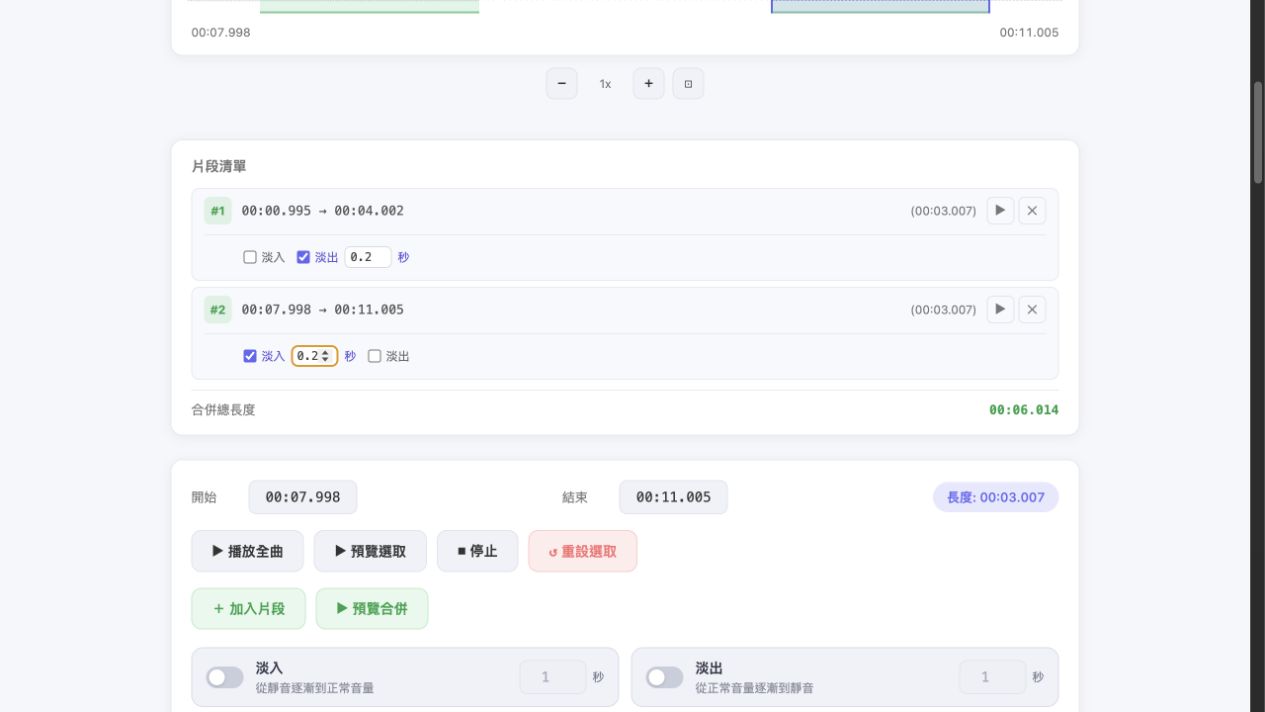
We generated a 12.000-second, 1.0 MB mono WAV with FFmpeg. The source contained three distinct test tones. In the live interface, we dragged two keep ranges: 00:00.995–00:04.002 and 00:07.998–00:11.005. Each segment measured 3.007 seconds, and the segment list reported a combined duration of 6.014 seconds.
The few milliseconds around each target are worth noting. A mouse drag maps screen pixels to time, so it may not land on an exact whole second. For dialogue or beat-sensitive edits, zoom the waveform and adjust the handles after the first drag.
This is not the same as joining files
Merging audio files usually joins several separate source files. Multi-segment editing selects several ranges from one long recording. It is useful for removing mistakes, ads, waiting time, or private material while keeping everything else in order.
Step-by-step
- Load the audio and select the first section to keep.
- Click Add Segment, select the next section, and add it too.
- Drag segments to reorder them. Each segment can have its own fade settings.
- Preview the merged result, then export the complete file.
Make joins sound natural
- Cut during sentence pauses, beat gaps, or quieter moments.
- Use a very short fade on speech joins to prevent clicks.
- After reordering, preview the meaning and rhythm of the result.
- Choose WAV for further production or MP3 for everyday sharing.
If you only need to trim the beginning or end, one selected range is enough. Create multiple keep segments only when there are several cuts in the middle.
Cut and merge multiple sections